
Dynamics AX to Dynamics 365 F&O Data Migration
Upgrade from Dynamics AX 2009 or AX 2012 to Dynamics 365 Finance & Operations with AI-powered data migration. Mine handles the data entity mapping, custom table analysis, and financial validation that make AX upgrades so labor-intensive.
Working with enterprise teams on active migration programs
6–10 weeks
to production-ready mappings
40–50%
cost reduction vs. manual migration
90%+
average mapping confidence
Most enterprise migrations start 6+ months behind schedule. Yours doesn't have to.
This guide is for VPs of IT, data architects, and migration leads at companies moving data from Microsoft Dynamics AX to Microsoft Dynamics 365 — whether you're scoping, planning, or mid-program.
Dynamics AX 2012 allows direct SQL table access (CustTable, VendTable, InventTable) while D365 Finance & Operations requires data import through data entities (CustCustomerV3Entity, VendVendorV2Entity) that aggregate multiple tables with business logic layers. Mine maps AX's direct table references to the correct D365 data entities automatically — including fields not exposed in standard entities.
Based on enterprise migration programs led by Mine's founding team
Last updated March 2026
How Mine automates your Microsoft Dynamics AX to Microsoft Dynamics 365 migration
Mine maps AX direct table references (CustTable, VendTable, InventTable) to their D365 data entity equivalents (CustCustomerV3Entity, VendVendorV2Entity, ReleasedProductV2Entity) — including fields that aren't exposed in standard entities.
Financial dimension values and combinations are automatically profiled and validated against D365's dimension framework — catching invalid combinations and orphaned dimension values before migration.
AOT customizations are detected by comparing your AX schema against the standard AX baseline. Custom fields, extended tables, and modified enums are cataloged with proposed D365 extension mappings.
Mine validates number sequence continuity — ensuring migrated documents retain their original IDs while D365 sequences start from the correct next value with no overlaps.
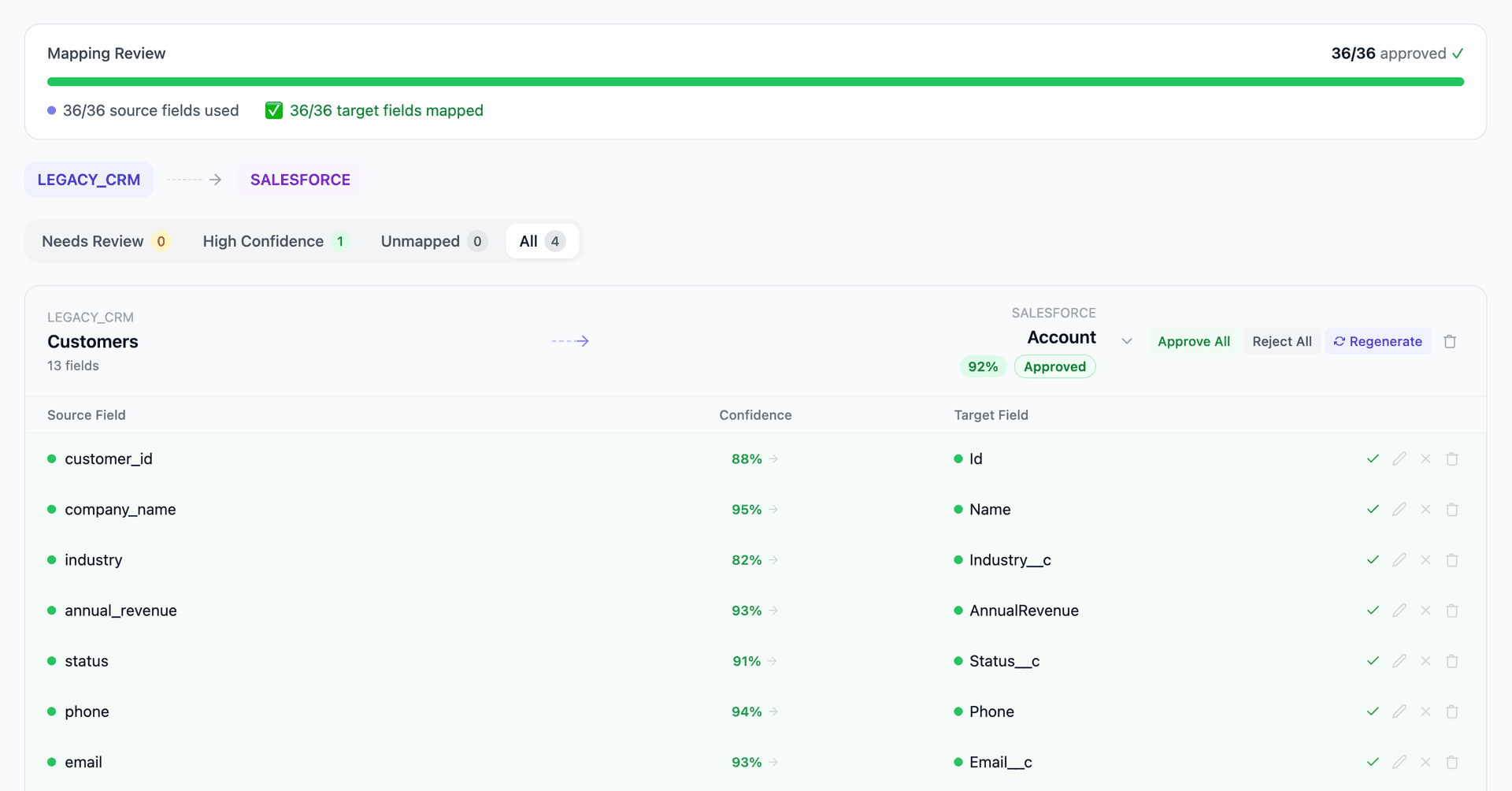
Get your Microsoft Dynamics AX to Microsoft Dynamics 365 mapping analysis — see results in under an hour
Migration timeline: manual vs. Mine
Traditional approach
Timeline
8–16 months
Estimated cost
$800K–3M
Team size
5–10 consultants
Typically requires
×Manual field mapping in spreadsheets
×Custom ABAP/SQL extraction scripts
×3–5 mock migration cycles
×Dedicated source system consultants
×Manual reconciliation testing
With Mine
Enterprise benchmarksTimeline
6–10 weeks
Team size
2–3 internal resources
Estimated cost
40–50% less
Included
✓Schema profiling & analysis
✓AI-generated field mappings
✓Transformation SQL
✓Validation & readiness reports
✓Production-ready load files
Common challenges migrating from Microsoft Dynamics AX to Microsoft Dynamics 365
AX direct table access vs. D365 data entity framework
AX 2012 allows direct SQL access to tables like CustTable, VendTable, and InventTable. D365 F&O requires data import through data entities (CustCustomerV3Entity, VendVendorV2Entity) that aggregate multiple tables with business logic layers. Mapping AX tables to the correct data entities — and handling fields that don't surface in standard entities — requires deep analysis.
Explore related migrations →Financial dimensions restructuring
AX 2012 R3 introduced a financial dimensions framework that D365 F&O further evolved. Dimension set storage, default dimension combinations, and ledger dimension patterns all changed. Historical transactions must be migrated with their dimension values intact, and the new dimension framework validated against D365's account structure rules.
Explore related migrations →AOT customizations and overlayering removal
AX's Application Object Tree (AOT) allowed direct overlayering of standard objects — tables, forms, classes. D365 F&O eliminated overlayering in favor of extensions. Custom fields added via overlayering must be migrated to extension-based custom fields, and custom tables need equivalent data entities created in D365.
Explore related migrations →Number sequence migration and gap handling
AX and D365 use different number sequence engines. Migrated documents must preserve their original numbers for audit continuity, while new documents in D365 must start from the correct sequence. Gaps between migrated and new number sequences need careful configuration.
Explore related migrations →Microsoft Dynamics AX to Microsoft Dynamics 365 field mapping — what data moves
11 data objects typically migrated
| Source Object | → | Target Object |
|---|---|---|
| CustTable (Customer) | → | CustCustomerV3Entity |
| VendTable (Vendor) | → | VendVendorV2Entity |
| LedgerJournalTable / Trans | → | LedgerJournalEntity |
| InventTable (Item) | → | ReleasedProductV2Entity |
| SalesTable / SalesLine | → | SalesOrderHeaderV2Entity / Lines |
| PurchTable / PurchLine | → | PurchaseOrderHeaderV2Entity / Lines |
| CustTrans (AR Transactions) | → | Customer payment journal |
| VendTrans (AP Transactions) | → | Vendor payment journal |
| BOMTable / BOMLine (BOMs) | → | BillOfMaterialsV3Entity |
| ProjTable (Projects) | → | ProjectEntity |
| HcmWorker (Employees) | → | HcmWorkerEntity |
Typical enterprise migrations include 500K–10M+ records across these objects. Mine handles profiling and mapping at any scale.
The cost of manual Microsoft Dynamics AX to Microsoft Dynamics 365 migration
Microsoft provides the Data Migration Toolkit and Lifecycle Services (LCS) for AX-to-D365 upgrades, but these tools handle standard data entities only. Customized AX installations — which represent the majority of enterprise deployments — require significant manual effort to map modified tables, custom fields, and ISV solutions to D365 equivalents.
Frequently asked questions
In one enterprise migration, a single field mapping error in customer master data caused $100K in billing discrepancies that went undetected for 6 months.
Mine catches these issues before they reach production.
Built by a team that led SAP, Oracle, and Salesforce data migration programs for Fortune 500 companies at a Big 4 consulting firm. Currently in design partnership with enterprise clients running active migration programs.
Ready to migrate from Microsoft Dynamics AX to Microsoft Dynamics 365?
Tell us about your migration and we'll show you how Mine can help.
No commitment required. We'll review your migration scope and share a preliminary assessment within 48 hours.
You'll receive a preliminary mapping analysis showing how your source objects map to your target schema, with confidence scores and flagged risk areas.