
Salesforce to Zoho CRM Data Migration
Right-sizing your CRM? Mine automates the mapping from Salesforce's complex object model to Zoho's streamlined module architecture — preserving contacts, deals, custom objects, and activity history while cutting licensing costs.
Working with enterprise teams on active migration programs
2–3 weeks
to production-ready mappings
40–50%
cost reduction vs. manual migration
90%+
average mapping confidence
Most enterprise migrations start 6+ months behind schedule. Yours doesn't have to.
This guide is for VPs of IT, data architects, and migration leads at companies moving data from Salesforce to Zoho CRM — whether you're scoping, planning, or mid-program.
Salesforce uses a rigidly typed object model with validation rules, Apex triggers, record types, and complex sharing rules, while Zoho CRM uses a simpler module-based architecture with Blueprints and custom modules. Mine translates Salesforce's enterprise complexity into Zoho's streamlined model — ensuring nothing critical is lost when simplifying your CRM stack.
Based on enterprise migration programs led by Mine's founding team
Last updated March 2026
How Mine automates your Salesforce to Zoho CRM migration
Mine profiles every Salesforce object and field, then generates a mapping to Zoho modules — flagging where Salesforce complexity needs to be simplified and proposing the Zoho alternative for each pattern.
Record type usage is analyzed across your Salesforce data. Mine recommends whether each record type becomes a Zoho Layout Rule, a custom picklist filter, or a separate module.
Custom objects with master-detail relationships are mapped to Zoho custom modules or subforms based on data volume and relationship complexity.
Mine catalogs all Apex, Flow, and validation rule field dependencies — generating a rebuild checklist for your Zoho admin to implement using Blueprints and Deluge.
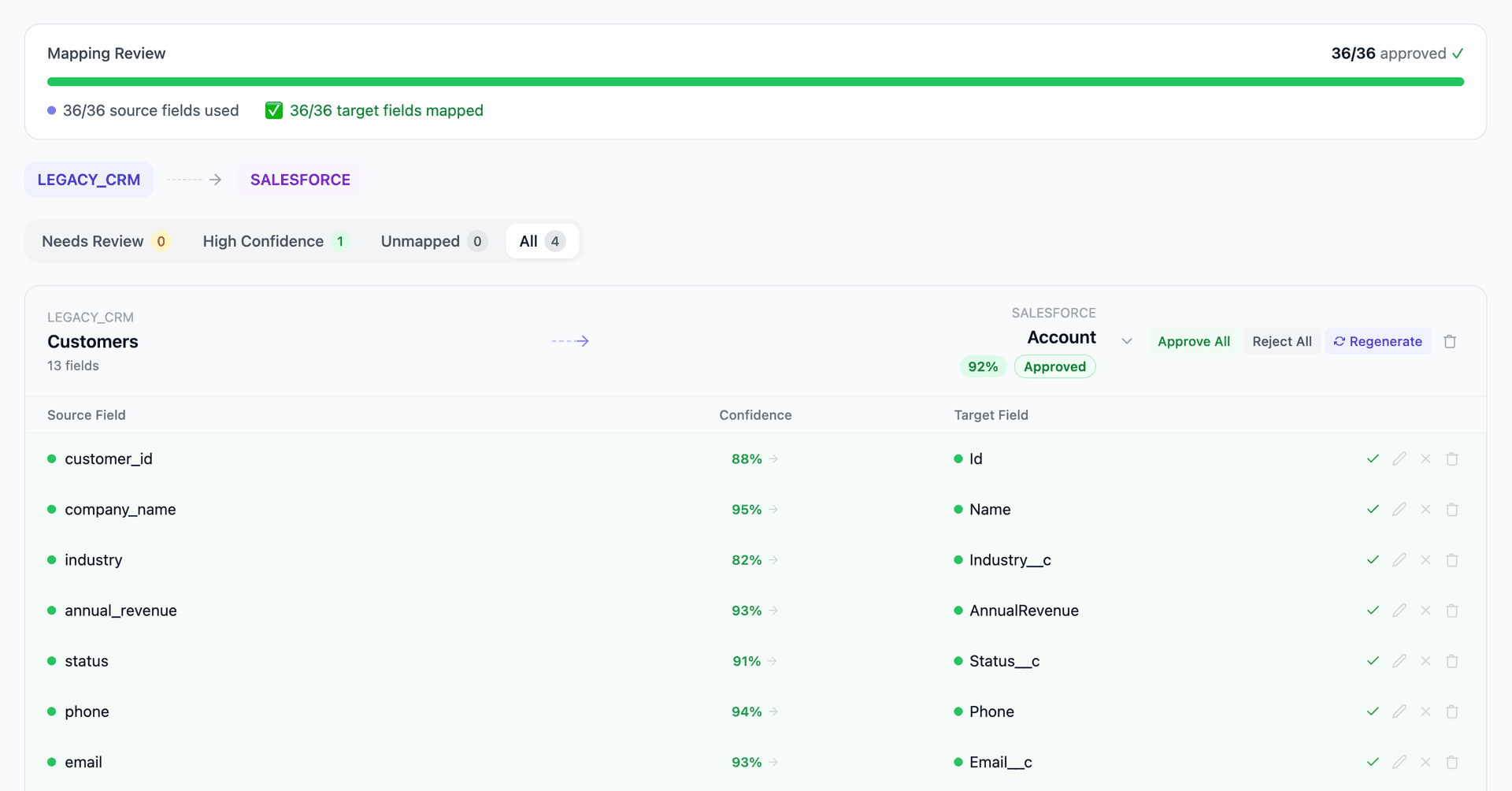
Get your Salesforce to Zoho CRM mapping analysis — see results in under an hour
Migration timeline: manual vs. Mine
Traditional approach
Timeline
2–4 months
Estimated cost
$50K–200K
Team size
1–3 consultants
Typically requires
×Manual field mapping in spreadsheets
×Custom ABAP/SQL extraction scripts
×3–5 mock migration cycles
×Dedicated source system consultants
×Manual reconciliation testing
With Mine
Enterprise benchmarksTimeline
2–3 weeks
Team size
1 internal resource
Estimated cost
40–50% less
Included
✓Schema profiling & analysis
✓AI-generated field mappings
✓Transformation SQL
✓Validation & readiness reports
✓Production-ready load files
Common challenges migrating from Salesforce to Zoho CRM
Salesforce record types to Zoho alternatives
Salesforce record types control which picklist values, page layouts, and sales processes apply to each record. Zoho has no native record type concept. Alternatives include Zoho's Layout Rules, custom picklist fields that filter other fields, or separate modules. Each record type usage pattern needs individual analysis.
Explore related migrations →Custom object complexity reduction
Salesforce custom objects with master-detail relationships and roll-up summary fields must be translated to Zoho custom modules with lookup relationships. Roll-up summaries don't exist in Zoho — they need Deluge custom functions or manual workarounds. Some Salesforce custom objects may be better modeled as Zoho subforms rather than separate modules.
Explore related migrations →Apex and Flow automation translation
Salesforce's Apex code, validation rules, and Flows contain business logic that must be rebuilt in Zoho using Blueprints, workflow rules, and Deluge scripts. Mine doesn't migrate the automation logic but catalogs every field referenced by Salesforce automation, so the Zoho admin knows exactly what to rebuild.
Explore related migrations →Engagement and activity history volume
Mature Salesforce orgs accumulate millions of Task, Event, and EmailMessage records. Zoho's import tool has practical limits on activity data volume. Deciding how much history to migrate vs. archive requires analysis of activity volume, recency, and reporting requirements.
Explore related migrations →Salesforce to Zoho CRM field mapping — what data moves
10 data objects typically migrated
| Source Object | → | Target Object |
|---|---|---|
| Account | → | Accounts |
| Contact | → | Contacts |
| Lead | → | Leads |
| Opportunity | → | Deals |
| OpportunityLineItem | → | Deal Products |
| Product2 | → | Products |
| Case | → | Cases (Desk) |
| Task / Event | → | Tasks / Events |
| Campaign | → | Campaigns |
| Custom Objects | → | Custom Modules |
Typical enterprise migrations include 500K–10M+ records across these objects. Mine handles profiling and mapping at any scale.
The cost of manual Salesforce to Zoho CRM migration
Companies typically export from Salesforce via Data Loader and import to Zoho using Zoho's import wizard. The bigger challenge isn't moving the data — it's deciding what to simplify, what to preserve, and what to retire from Salesforce's more complex architecture.
Frequently asked questions
Related migration paths
In one enterprise migration, a single field mapping error in customer master data caused $100K in billing discrepancies that went undetected for 6 months.
Mine catches these issues before they reach production.
Built by a team that led SAP, Oracle, and Salesforce data migration programs for Fortune 500 companies at a Big 4 consulting firm. Currently in design partnership with enterprise clients running active migration programs.
Ready to migrate from Salesforce to Zoho CRM?
Tell us about your migration and we'll show you how Mine can help.
No commitment required. We'll review your migration scope and share a preliminary assessment within 48 hours.
You'll receive a preliminary mapping analysis showing how your source objects map to your target schema, with confidence scores and flagged risk areas.