
Zendesk to HubSpot Data Migration
Consolidating service into HubSpot? Mine automates the mapping between Zendesk's ticket model and HubSpot's ticket and conversation architecture — preserving support history and customer relationships.
Working with enterprise teams on active migration programs
2–3 weeks
to production-ready mappings
40–50%
cost reduction vs. manual migration
90%+
average mapping confidence
Most enterprise migrations start 6+ months behind schedule. Yours doesn't have to.
This guide is for VPs of IT, data architects, and migration leads at companies moving data from Zendesk to HubSpot — whether you're scoping, planning, or mid-program.
Zendesk stores support data in tickets with custom fields, tags, and a conversation thread model, while HubSpot Service Hub uses tickets with properties, pipelines, and a conversations inbox. Mine maps Zendesk's mature help desk model to HubSpot's integrated CRM-service architecture — translating custom fields to properties and tags to ticket properties.
Based on enterprise migration programs led by Mine's founding team
Last updated March 2026
How Mine automates your Zendesk to HubSpot migration
Mine maps Zendesk tickets to HubSpot tickets with pipeline and stage configuration — translating Zendesk's status model (New, Open, Pending, Solved, Closed) to HubSpot's customizable ticket pipelines.
Tags are analyzed and converted to HubSpot ticket properties — Mine recommends which tags become dropdown values, multi-select options, or separate boolean properties based on usage patterns.
Conversation threads are preserved as HubSpot timeline activities — public comments become email activities, internal notes become internal notes, with timestamps and attribution maintained.
Mine profiles your Zendesk feature usage and generates a gap analysis — showing which Zendesk capabilities have HubSpot equivalents, which need workarounds, and which are not available.
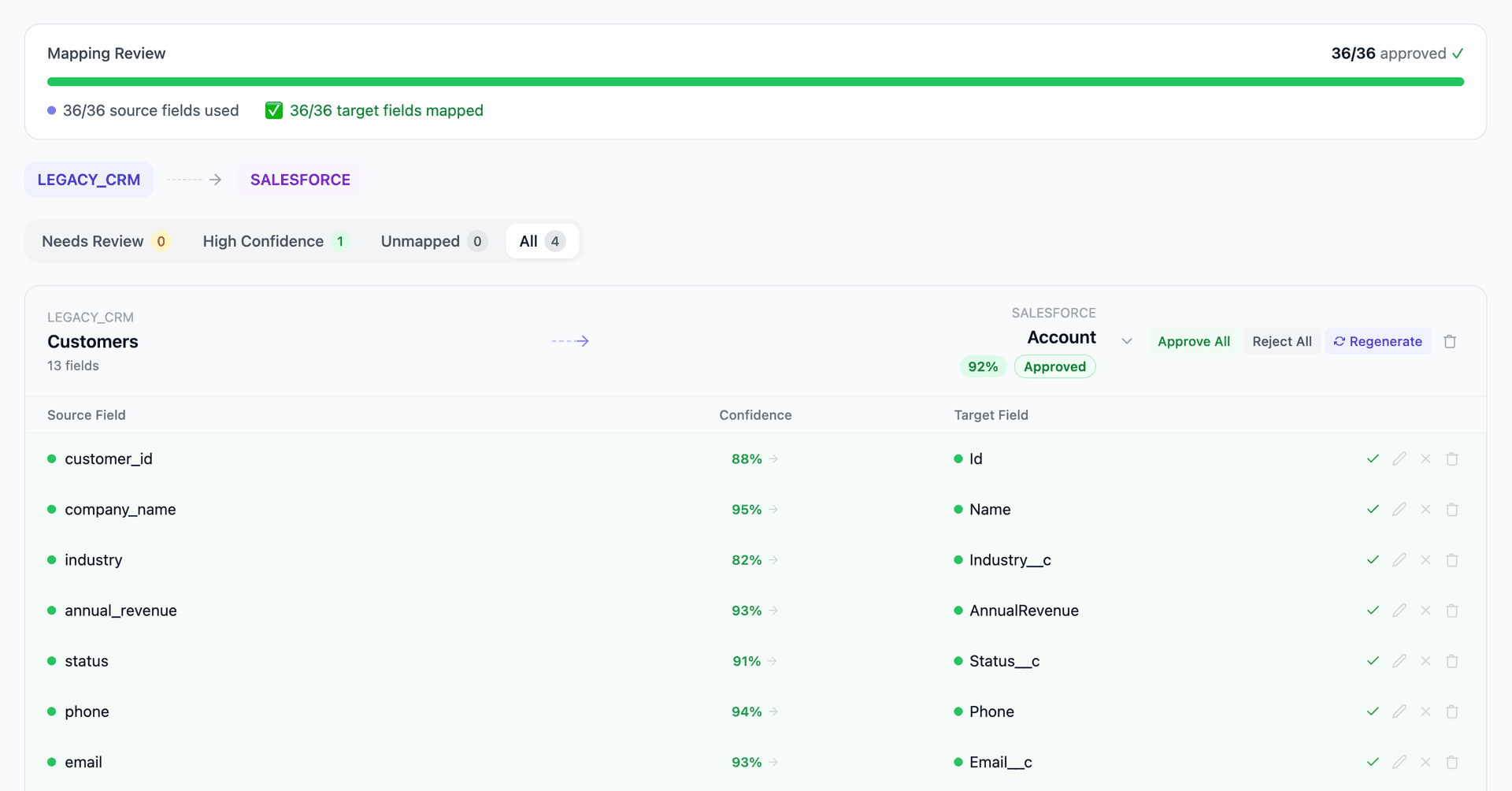
Get your Zendesk to HubSpot mapping analysis — see results in under an hour
Migration timeline: manual vs. Mine
Traditional approach
Timeline
1–3 months
Estimated cost
$50K–200K
Team size
1–3 consultants
Typically requires
×Manual field mapping in spreadsheets
×Custom ABAP/SQL extraction scripts
×3–5 mock migration cycles
×Dedicated source system consultants
×Manual reconciliation testing
With Mine
Enterprise benchmarksTimeline
2–3 weeks
Team size
1 internal resource
Estimated cost
40–50% less
Included
✓Schema profiling & analysis
✓AI-generated field mappings
✓Transformation SQL
✓Validation & readiness reports
✓Production-ready load files
Common challenges migrating from Zendesk to HubSpot
Zendesk's mature features vs. HubSpot Service Hub
Zendesk's ticket forms, conditional fields, SLA policies, and satisfaction surveys are more mature than HubSpot's equivalents. Some Zendesk features (ticket forms controlling field visibility, advanced SLA breach tracking) don't exist in HubSpot. Mine profiles your Zendesk feature usage and flags which capabilities need HubSpot alternatives vs. which are lost.
Explore related migrations →Tag-to-property conversion
Zendesk uses tags extensively for classification, routing, and reporting. HubSpot doesn't have a native tag system for tickets. Tags must be converted to ticket properties (dropdown, multi-select, checkbox) or pipeline stages. Mine analyzes tag usage and proposes the optimal HubSpot property for each.
Explore related migrations →Conversation thread migration
Zendesk's ticket conversation thread includes public comments, internal notes, and system events in chronological order. HubSpot stores ticket activity as timeline entries with different types (emails, notes, calls). Preserving the full conversation history with correct chronology and visibility requires mapping Zendesk's linear thread to HubSpot's activity timeline.
Explore related migrations →Help Center to HubSpot Knowledge Base
Zendesk's Help Center with categories, sections, and community features is more mature than HubSpot's Knowledge Base. Article content migrates, but community forums, user-generated content, and multi-language article variants need careful handling. HubSpot Knowledge Base requires Service Hub Professional or Enterprise.
Explore related migrations →Zendesk to HubSpot field mapping — what data moves
10 data objects typically migrated
| Source Object | → | Target Object |
|---|---|---|
| Ticket | → | Ticket |
| Ticket Comment (public) | → | Email / Note activity |
| Ticket Comment (internal) | → | Note (internal) |
| User (end user) | → | Contact |
| Organization | → | Company |
| Custom Fields | → | Ticket properties |
| Tags | → | Properties / Multi-select |
| Help Center Article | → | Knowledge Article |
| Satisfaction Rating | → | Custom property |
| Attachment | → | File attachment |
Typical enterprise migrations include 500K–10M+ records across these objects. Mine handles profiling and mapping at any scale.
The cost of manual Zendesk to HubSpot migration
Companies typically use HubSpot's native data import or third-party tools. The custom field mapping, tag conversion, and conversation history migration still require significant manual effort.
Frequently asked questions
Related migration paths
In one enterprise migration, a single field mapping error in customer master data caused $100K in billing discrepancies that went undetected for 6 months.
Mine catches these issues before they reach production.
Built by a team that led SAP, Oracle, and Salesforce data migration programs for Fortune 500 companies at a Big 4 consulting firm. Currently in design partnership with enterprise clients running active migration programs.
Ready to migrate from Zendesk to HubSpot?
Tell us about your migration and we'll show you how Mine can help.
No commitment required. We'll review your migration scope and share a preliminary assessment within 48 hours.
You'll receive a preliminary mapping analysis showing how your source objects map to your target schema, with confidence scores and flagged risk areas.