
Salesforce Org Consolidation & Merge
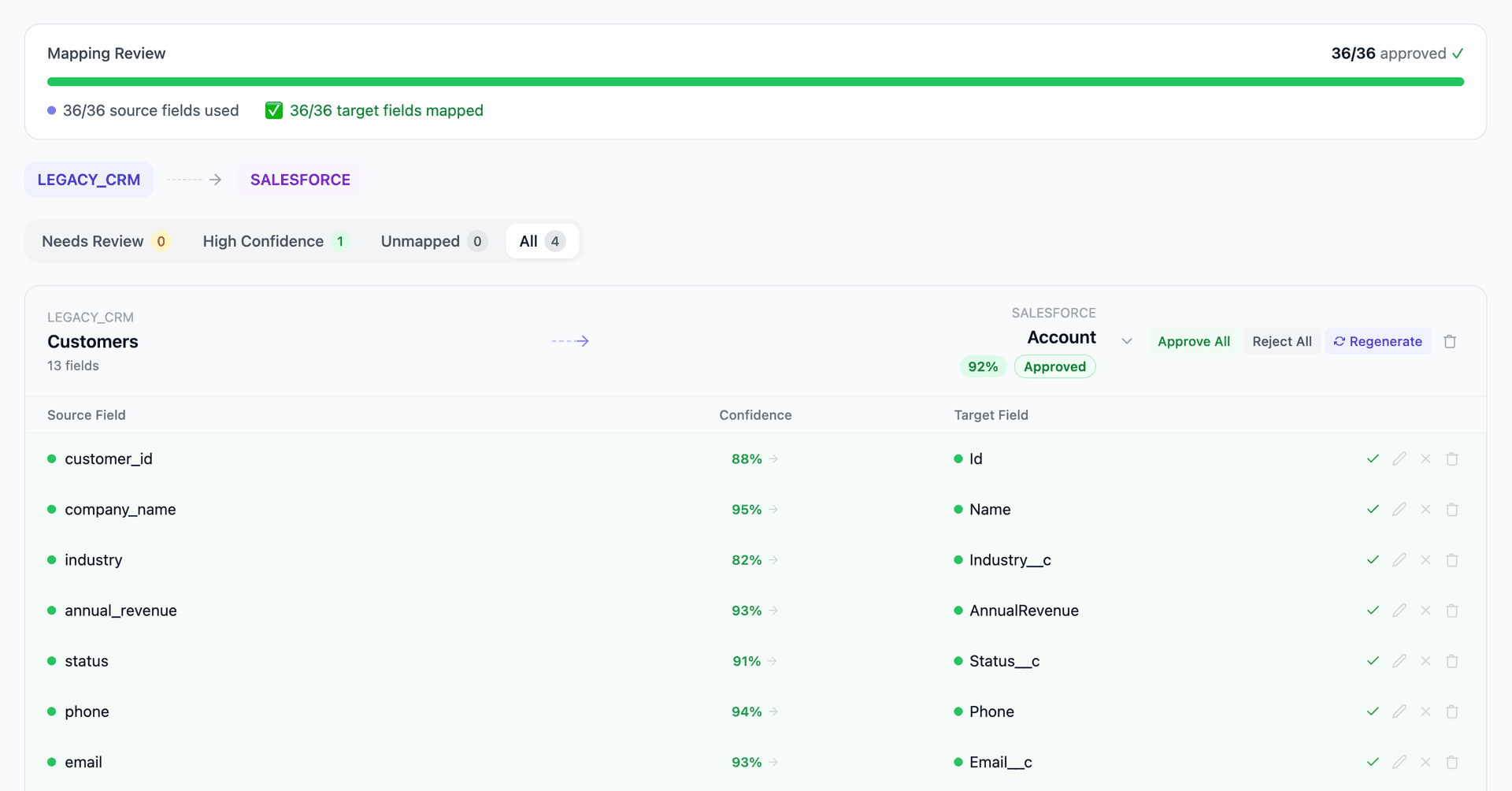
Merging two Salesforce orgs after an acquisition? Mine automates the schema comparison, field mapping, and data deduplication between source and target orgs — even when both have custom objects, different picklist values, and conflicting record types.
Working with enterprise teams on active migration programs
3–8 weeks
to production-ready mappings
40–50%
cost reduction vs. manual migration
90%+
average mapping confidence
Most enterprise migrations start 6+ months behind schedule. Yours doesn't have to.
This guide is for VPs of IT, data architects, and migration leads at companies moving data from Salesforce to Salesforce — whether you're scoping, planning, or mid-program.
Each Salesforce org has its own schema — custom objects, custom fields, picklist values, record types, validation rules, and Apex triggers built independently over years. When two orgs merge, Account, Contact, Opportunity, and Case objects from the source org must map to the target org's schema — but field names don't match, picklist values differ, and record types conflict. Mine compares both schemas side by side and generates the field-level mapping automatically.
Based on enterprise migration programs led by Mine's founding team
Last updated March 2026
How Mine automates your Salesforce to Salesforce migration
Mine profiles both Salesforce orgs simultaneously and generates a side-by-side schema comparison — showing field matches, type conflicts, picklist divergence, and custom object gaps across every object.
Picklist value mapping is generated automatically — Mine matches semantically equivalent values between orgs (e.g., 'Enterprise' → 'Tier 1', 'Closed Won' → 'Won') and flags values that require business decision.
Account and contact deduplication uses fuzzy matching on name, domain, address, and phone to identify shared records across orgs — with confidence scores so the team can set their own merge threshold.
Mine generates the complete ID crosswalk for lookup and master-detail relationships, ensuring that when Org A records move to Org B, every relationship (Contact → Account, Opportunity → Account, Case → Contact) remaps correctly.
Get your Salesforce to Salesforce mapping analysis — see results in under an hour
Migration timeline: manual vs. Mine
Traditional approach
Timeline
3–12 months
Estimated cost
$200K–1.5M
Team size
4–10 Salesforce consultants
Typically requires
×Manual field mapping in spreadsheets
×Custom ABAP/SQL extraction scripts
×3–5 mock migration cycles
×Dedicated source system consultants
×Manual reconciliation testing
With Mine
Enterprise benchmarksTimeline
3–8 weeks
Team size
2–4 internal resources
Estimated cost
40–50% less
Included
✓Schema profiling & analysis
✓AI-generated field mappings
✓Transformation SQL
✓Validation & readiness reports
✓Production-ready load files
Common challenges migrating from Salesforce to Salesforce
Schema divergence on standard objects
Both orgs have Account, Contact, Opportunity, and Case objects — but each has different custom fields, different field types for similar data, and different required fields. A 'Region' field might be a picklist in one org and a text field in the other. Mine profiles both schemas simultaneously and generates a side-by-side comparison showing matches, conflicts, and gaps for every field on every object.
Explore related migrations →Picklist and record type harmonization
Picklist values are the most common source of merge conflicts. Industry values, lead sources, opportunity stages, case priorities — all defined independently in each org. Record types add another layer: Org A might have Account record types for 'Customer' and 'Partner' while Org B uses 'Enterprise' and 'Channel'. Mine detects all picklist and record type conflicts and generates the value mapping between orgs.
Explore related migrations →Custom object and relationship mapping
Each org has custom objects built for its specific business processes — custom quote objects, custom project tracking, custom subscription management. Some overlap semantically but differ structurally. Mine identifies custom objects in the source org, matches them to semantic equivalents in the target org where they exist, and flags objects that have no target equivalent and require new object creation or data restructuring.
Explore related migrations →Account and contact deduplication
The two orgs almost certainly share customers and contacts — the same company exists as an Account in both orgs with different record IDs, different field values, and different related records (opportunities, cases, activities). Deduplication requires fuzzy matching on name, domain, address, and phone. Mine identifies duplicate accounts and contacts across orgs with confidence scoring.
Explore related migrations →Lookup and master-detail relationship preservation
Salesforce records reference each other through lookup and master-detail relationships using record IDs. When migrating from Org A to Org B, all Org A record IDs change. Every lookup field — Contact.AccountId, Opportunity.AccountId, Case.ContactId — must be remapped to the new target IDs. Mine generates the ID crosswalk and relationship remapping for all objects.
Explore related migrations →Salesforce to Salesforce field mapping — what data moves
12 data objects typically migrated
| Source Object | → | Target Object |
|---|---|---|
| Account (Org A) | → | Account (Org B) |
| Contact (Org A) | → | Contact (Org B) |
| Opportunity (Org A) | → | Opportunity (Org B) |
| OpportunityLineItem (Org A) | → | OpportunityLineItem (Org B) |
| Case (Org A) | → | Case (Org B) |
| Lead (Org A) | → | Lead (Org B) |
| Task / Event (Org A) | → | Task / Event (Org B) |
| Custom Objects (Org A) | → | Custom Objects (Org B) or New Objects |
| Product2 / PricebookEntry | → | Product2 / PricebookEntry |
| Campaign / CampaignMember | → | Campaign / CampaignMember |
| Attachment / ContentDocument | → | ContentDocument |
| User (Org A) | → | User (Org B) |
Typical enterprise migrations include 500K–10M+ records across these objects. Mine handles profiling and mapping at any scale.
The cost of manual Salesforce to Salesforce migration
Post-M&A Salesforce consolidation projects are typically run by Salesforce consulting partners over 3–12 months. The data workstream — schema comparison, field mapping, picklist harmonization, deduplication, and record migration — is the most unpredictable part because the scope isn't visible until both orgs are profiled.
Frequently asked questions
Related migration paths
In one enterprise migration, a single field mapping error in customer master data caused $100K in billing discrepancies that went undetected for 6 months.
Mine catches these issues before they reach production.
Built by a team that led SAP, Oracle, and Salesforce data migration programs for Fortune 500 companies at a Big 4 consulting firm. Currently in design partnership with enterprise clients running active migration programs.
Ready to migrate from Salesforce to Salesforce?
Tell us about your migration and we'll show you how Mine can help.
No commitment required. We'll review your migration scope and share a preliminary assessment within 48 hours.
You'll receive a preliminary mapping analysis showing how your source objects map to your target schema, with confidence scores and flagged risk areas.