
Salesforce to ServiceNow Data Migration
Moving service operations from Salesforce to ServiceNow? Mine automates the mapping between Salesforce's Case model and ServiceNow's Incident/Request architecture — preserving case history, SLAs, and knowledge base content.
Working with enterprise teams on active migration programs
3–5 weeks
to production-ready mappings
40–50%
cost reduction vs. manual migration
90%+
average mapping confidence
Most enterprise migrations start 6+ months behind schedule. Yours doesn't have to.
This guide is for VPs of IT, data architects, and migration leads at companies moving data from Salesforce to ServiceNow — whether you're scoping, planning, or mid-program.
Salesforce stores service data in Cases, Knowledge Articles, and Entitlements with Omni-Channel routing, while ServiceNow uses Incidents, Requests, Problems, and Changes in an ITIL-aligned service management model. Mine translates Salesforce's CRM-centric service model to ServiceNow's ITSM architecture — mapping Cases to the correct ServiceNow table based on case type and category.
Based on enterprise migration programs led by Mine's founding team
Last updated March 2026
How Mine automates your Salesforce to ServiceNow migration
Mine classifies Salesforce Cases into ServiceNow Incidents, Requests, Problems, or Changes based on case type, category, and custom field analysis — generating routing rules you approve before migration.
Knowledge Articles are mapped with content, metadata, categorization, and version history preserved — translated from Salesforce's article type model to ServiceNow's knowledge base structure.
Case comments are classified as ServiceNow Work Notes (internal) or Additional Comments (customer-facing) based on Salesforce's public/private comment flags.
Mine generates a complete User-to-sys_user mapping with Queue-to-Assignment-Group translation for the service desk routing configuration.
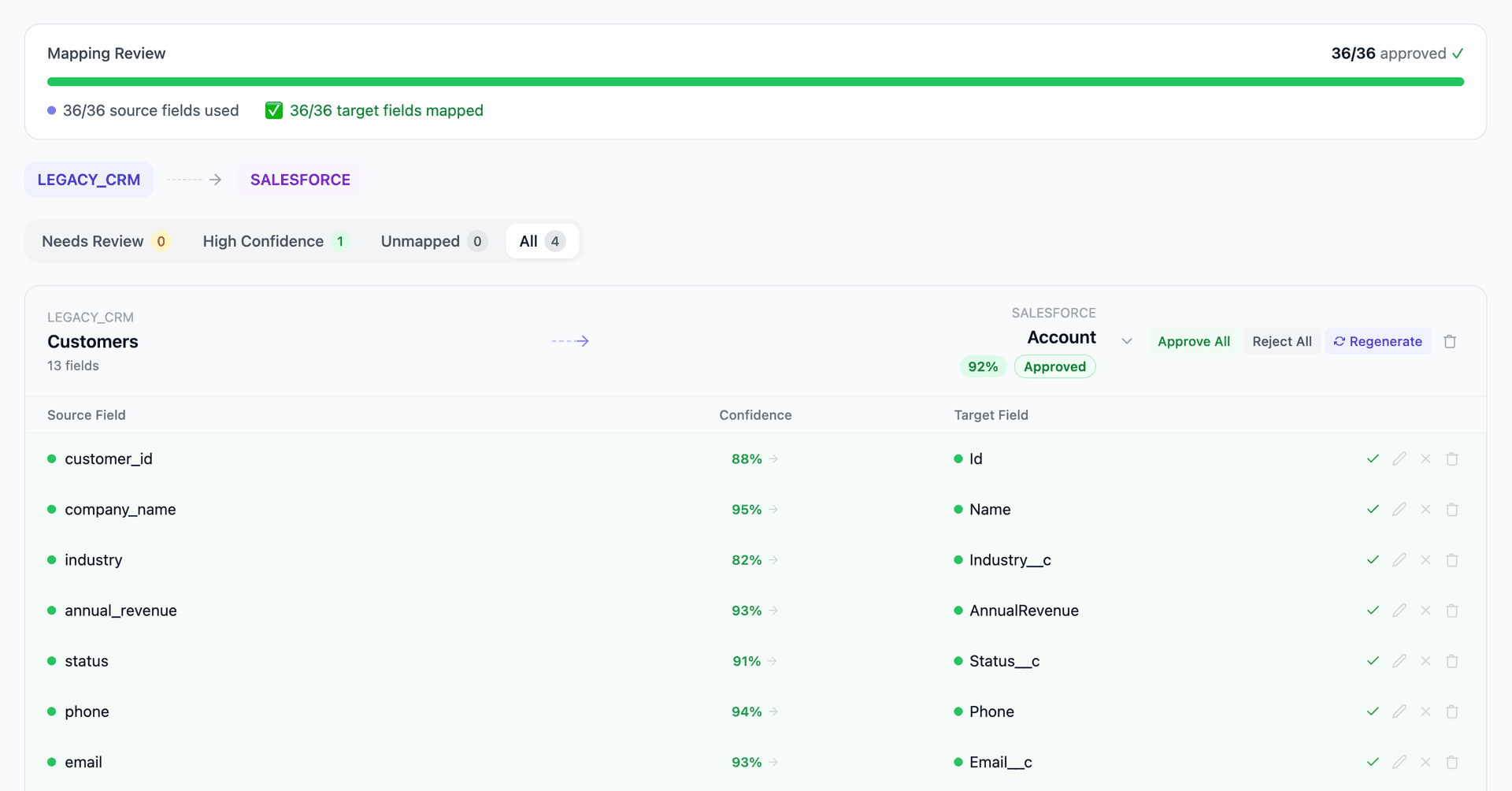
Get your Salesforce to ServiceNow mapping analysis — see results in under an hour
Migration timeline: manual vs. Mine
Traditional approach
Timeline
3–6 months
Estimated cost
$200K–600K
Team size
3–5 consultants
Typically requires
×Manual field mapping in spreadsheets
×Custom ABAP/SQL extraction scripts
×3–5 mock migration cycles
×Dedicated source system consultants
×Manual reconciliation testing
With Mine
Enterprise benchmarksTimeline
3–5 weeks
Team size
1–2 internal resources
Estimated cost
40–50% less
Included
✓Schema profiling & analysis
✓AI-generated field mappings
✓Transformation SQL
✓Validation & readiness reports
✓Production-ready load files
Common challenges migrating from Salesforce to ServiceNow
Case-to-Incident/Request classification
Salesforce Cases are a single object type used for all service interactions. ServiceNow separates Incidents (break/fix), Service Requests (standard requests), Problems (root cause), and Changes (planned modifications) into distinct tables. Each Salesforce Case must be classified into the correct ServiceNow table based on case type, category, or custom fields.
Explore related migrations →Knowledge base migration and versioning
Salesforce Knowledge Articles use a versioning model with draft, published, and archived states plus article types. ServiceNow Knowledge uses a different versioning and workflow model with knowledge bases, categories, and articles. The article content, metadata, and version history must be migrated with correct categorization.
Explore related migrations →SLA and entitlement model differences
Salesforce Entitlements and Milestones track SLA compliance for Cases. ServiceNow uses SLA Definitions with different measurement mechanisms, escalation rules, and pause/resume logic. Migrating historical SLA data while maintaining compliance reporting continuity requires careful mapping of the SLA measurement model.
Explore related migrations →User and assignment model translation
Salesforce uses Queues, Assignment Rules, and Omni-Channel for case routing. ServiceNow uses Assignment Groups, Assignment Rules, and Flow Designer. The routing logic must be rebuilt, and historical case ownership must be mapped from Salesforce Users to ServiceNow sys_user records.
Explore related migrations →Salesforce to ServiceNow field mapping — what data moves
9 data objects typically migrated
| Source Object | → | Target Object |
|---|---|---|
| Case | → | Incident / Request / Problem |
| Case Comment | → | Work Note / Comment |
| Knowledge Article | → | Knowledge Article (kb_knowledge) |
| Account | → | Company (core_company) |
| Contact | → | Contact (customer_contact) |
| Entitlement | → | SLA Definition |
| Task (related) | → | Task (sn_task) |
| Attachment | → | Attachment (sys_attachment) |
| Queue | → | Assignment Group |
Typical enterprise migrations include 500K–10M+ records across these objects. Mine handles profiling and mapping at any scale.
The cost of manual Salesforce to ServiceNow migration
Companies typically manage this migration during ServiceNow implementation. The data conversion — especially case history classification into ServiceNow's ITIL categories — requires business analysis alongside technical mapping.
Frequently asked questions
Related migration paths
In one enterprise migration, a single field mapping error in customer master data caused $100K in billing discrepancies that went undetected for 6 months.
Mine catches these issues before they reach production.
Built by a team that led SAP, Oracle, and Salesforce data migration programs for Fortune 500 companies at a Big 4 consulting firm. Currently in design partnership with enterprise clients running active migration programs.
Ready to migrate from Salesforce to ServiceNow?
Tell us about your migration and we'll show you how Mine can help.
No commitment required. We'll review your migration scope and share a preliminary assessment within 48 hours.
You'll receive a preliminary mapping analysis showing how your source objects map to your target schema, with confidence scores and flagged risk areas.