
SAP ECC to Salesforce Data Migration
Automate the most complex parts of your SAP ECC to Salesforce migration. Mine handles schema profiling, field mapping, data transformation, and validation — so your team can focus on go-live, not spreadsheets.
Working with enterprise teams on active migration programs
4–8 weeks
to production-ready mappings
40–50%
cost reduction vs. manual migration
90%+
average mapping confidence
Most enterprise migrations start 6+ months behind schedule. Yours doesn't have to.
This guide is for VPs of IT, data architects, and migration leads at companies moving data from SAP ECC to Salesforce — whether you're scoping, planning, or mid-program.
SAP ECC stores customer and partner data across deeply normalized structures — KNA1 (general data), KNVV (sales area data), KNVK (contact persons), KNVP (partner functions) — while Salesforce uses a flatter object model with Accounts, Contacts, and Opportunities. Mine bridges this structural gap automatically, handling the schema translation, data transformation, and validation that typically consumes months of manual effort.
Based on enterprise migration programs led by Mine's founding team
Last updated March 2026
How Mine automates your SAP ECC to Salesforce migration
Mine auto-profiles SAP ECC customer tables (KNA1, KNVV, KNVK, KNVP) and maps them to Salesforce Account, Contact, and custom objects with 90%+ confidence — including sales area-specific fields.
Partner function hierarchies are automatically detected and mapped to Salesforce Contact Roles or custom junction objects based on your target architecture.
SAP number ranges are reconciled against Salesforce external ID fields with built-in deduplication logic that handles cross-company-code overlaps.
Mine generates production-ready SQL transformations for SAP date formats, currency conversions, and unit-of-measure mappings — validated against your Salesforce field constraints before the first load.
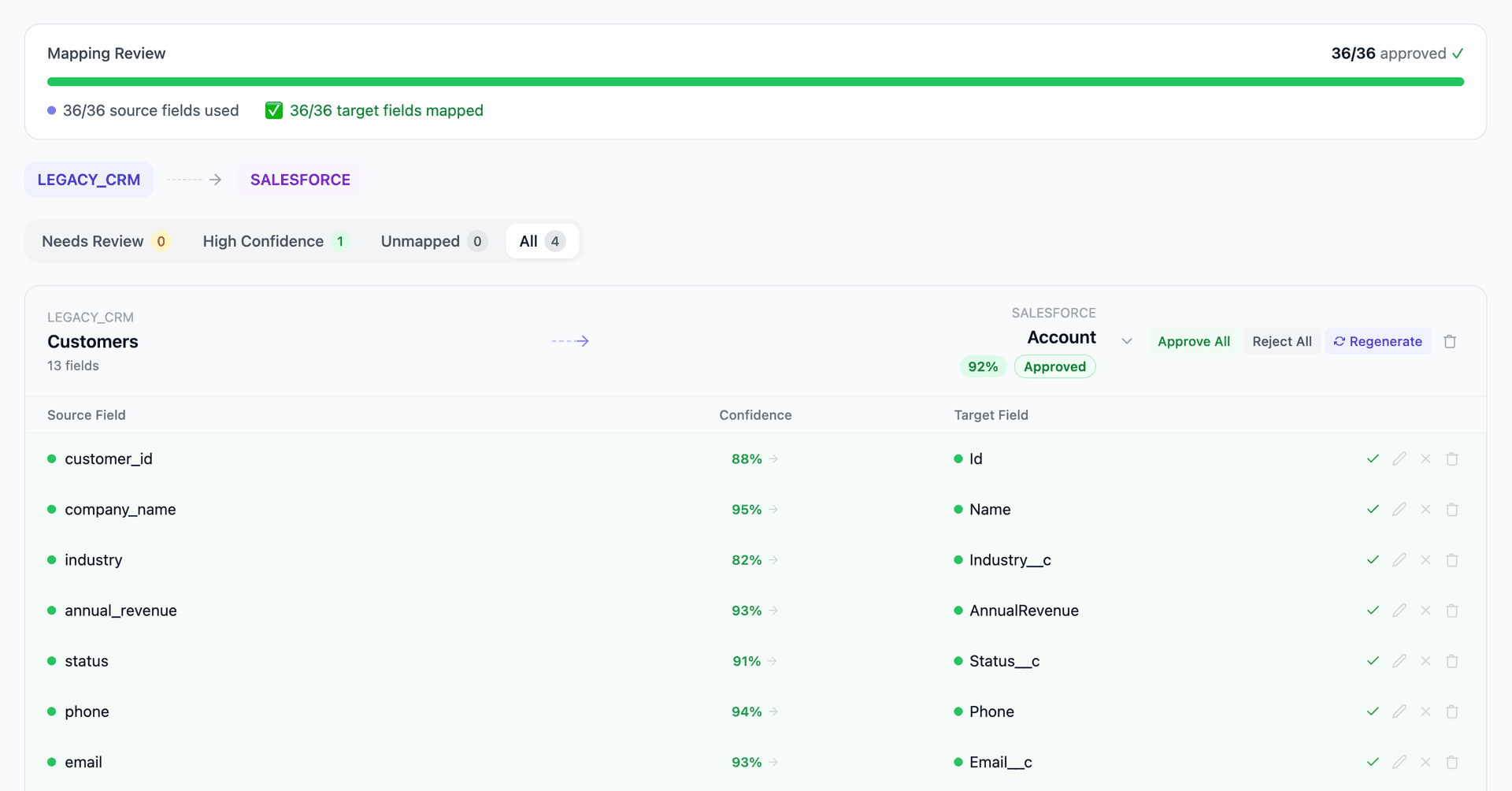
Get your SAP ECC to Salesforce mapping analysis — see results in under an hour
Migration timeline: manual vs. Mine
Traditional approach
Timeline
6–12 months
Estimated cost
$1M–3M
Team size
6–10 consultants (SAP + Salesforce)
Typically requires
×Manual field mapping in spreadsheets
×Custom ABAP/SQL extraction scripts
×3–5 mock migration cycles
×Dedicated source system consultants
×Manual reconciliation testing
With Mine
Enterprise benchmarksTimeline
4–8 weeks
Team size
1–2 internal resources
Estimated cost
40–50% less
Included
✓Schema profiling & analysis
✓AI-generated field mappings
✓Transformation SQL
✓Validation & readiness reports
✓Production-ready load files
Common challenges migrating from SAP ECC to Salesforce
SAP's normalized customer model vs. Salesforce's flat Accounts
SAP ECC splits customer data across KNA1, KNB1, KNVV, and KNVP tables organized by company code and sales area. Salesforce stores everything on the Account object with custom fields. Reconciling which SAP sales area maps to which Salesforce record type — and how to handle customers that exist in multiple company codes — requires business logic that can't be automated with simple field matching.
Explore related migrations →Partner function hierarchies
SAP's partner function concept (sold-to, ship-to, bill-to, payer) is deeply embedded in the sales document flow. Salesforce doesn't have a native equivalent — these relationships typically need to be modeled using Account hierarchies, custom junction objects, or Salesforce's Contact Roles. The mapping decision affects downstream process design.
Explore related migrations →SAP number ranges and external IDs
SAP uses configurable number ranges for customer, material, and document IDs that may overlap across company codes. Salesforce uses its own 18-character alphanumeric IDs. Maintaining bidirectional traceability requires careful external ID mapping and deduplication logic.
Explore related migrations →Sales organization-specific pricing and conditions
SAP's condition technique (pricing, discounts, surcharges) is stored across A-tables with complex access sequences. Salesforce CPQ or standard price books use a fundamentally different pricing model. Migrating pricing data requires business decisions about what to flatten, archive, or reconstruct.
Explore related migrations →Currency and unit-of-measure handling
SAP stores amounts in transaction currency, local currency, and group currency with explicit exchange rates. Salesforce uses a single currency per record with organization-level multi-currency support. Conversion logic must account for historical rates, rounding rules, and SAP's currency decimal configuration.
Explore related migrations →SAP ECC to Salesforce field mapping — what data moves
10 data objects typically migrated
| Source Object | → | Target Object |
|---|---|---|
| KNA1 (Customer Master) | → | Account |
| KNVV (Sales Area Data) | → | Account (custom fields) |
| KNVK (Contact Persons) | → | Contact |
| KNVP (Partner Functions) | → | Account Contact Role / Custom Object |
| VBAK/VBAP (Sales Orders) | → | Opportunity / Order |
| MARA/MAKT (Materials) | → | Product2 |
| A-Tables (Pricing Conditions) | → | PricebookEntry / CPQ |
| BSEG (Accounting Documents) | → | Custom Object / Archive |
| ADR (Addresses) | → | Account.BillingAddress / ShippingAddress |
| CDHDR/CDPOS (Change Documents) | → | Field History Tracking |
Typical enterprise migrations include 500K–10M+ records across these objects. Mine handles profiling and mapping at any scale.
The cost of manual SAP ECC to Salesforce migration
Most companies handle this migration through consulting engagements that rely on manual field mapping in spreadsheets and custom ABAP or middleware-based ETL. This approach typically takes 6–12 months, costs $1–3M, and requires deep SAP functional knowledge that's increasingly hard to find.
Frequently asked questions
Related migration paths
In one enterprise migration, a single field mapping error in customer master data caused $100K in billing discrepancies that went undetected for 6 months.
Mine catches these issues before they reach production.
Built by a team that led SAP, Oracle, and Salesforce data migration programs for Fortune 500 companies at a Big 4 consulting firm. Currently in design partnership with enterprise clients running active migration programs.
Ready to migrate from SAP ECC to Salesforce?
Tell us about your migration and we'll show you how Mine can help.
No commitment required. We'll review your migration scope and share a preliminary assessment within 48 hours.
You'll receive a preliminary mapping analysis showing how your source objects map to your target schema, with confidence scores and flagged risk areas.