
NetSuite to HubSpot Data Migration
Splitting your CRM out of NetSuite? Mine automates the field mapping between NetSuite's entity model and HubSpot's property-based system — preserving customer relationships, deal history, and activity data.
Working with enterprise teams on active migration programs
2–4 weeks
to production-ready mappings
40–50%
cost reduction vs. manual migration
90%+
average mapping confidence
Most enterprise migrations start 6+ months behind schedule. Yours doesn't have to.
This guide is for VPs of IT, data architects, and migration leads at companies moving data from NetSuite to HubSpot — whether you're scoping, planning, or mid-program.
NetSuite and HubSpot use fundamentally different data architectures. Mine bridges this structural gap automatically — handling schema profiling, field mapping, data transformation, and validation that typically consumes months of manual effort.
Based on enterprise migration programs led by Mine's founding team
Last updated March 2026
How Mine automates your NetSuite to HubSpot migration
Mine profiles NetSuite Customer records and separates CRM-relevant fields from ERP-only fields — generating a clean Company mapping that includes only the data HubSpot needs.
Subsidiary-specific data is analyzed and consolidation rules are proposed — whether to merge subsidiaries into a single HubSpot Company or create custom properties to preserve the segmentation.
NetSuite Opportunities and Estimates are mapped to HubSpot Deal pipelines with stage translation tables and probability alignment generated automatically.
Mine handles the activity history migration — routing NetSuite phone calls, tasks, and events to the correct HubSpot engagement types with company and contact associations preserved.
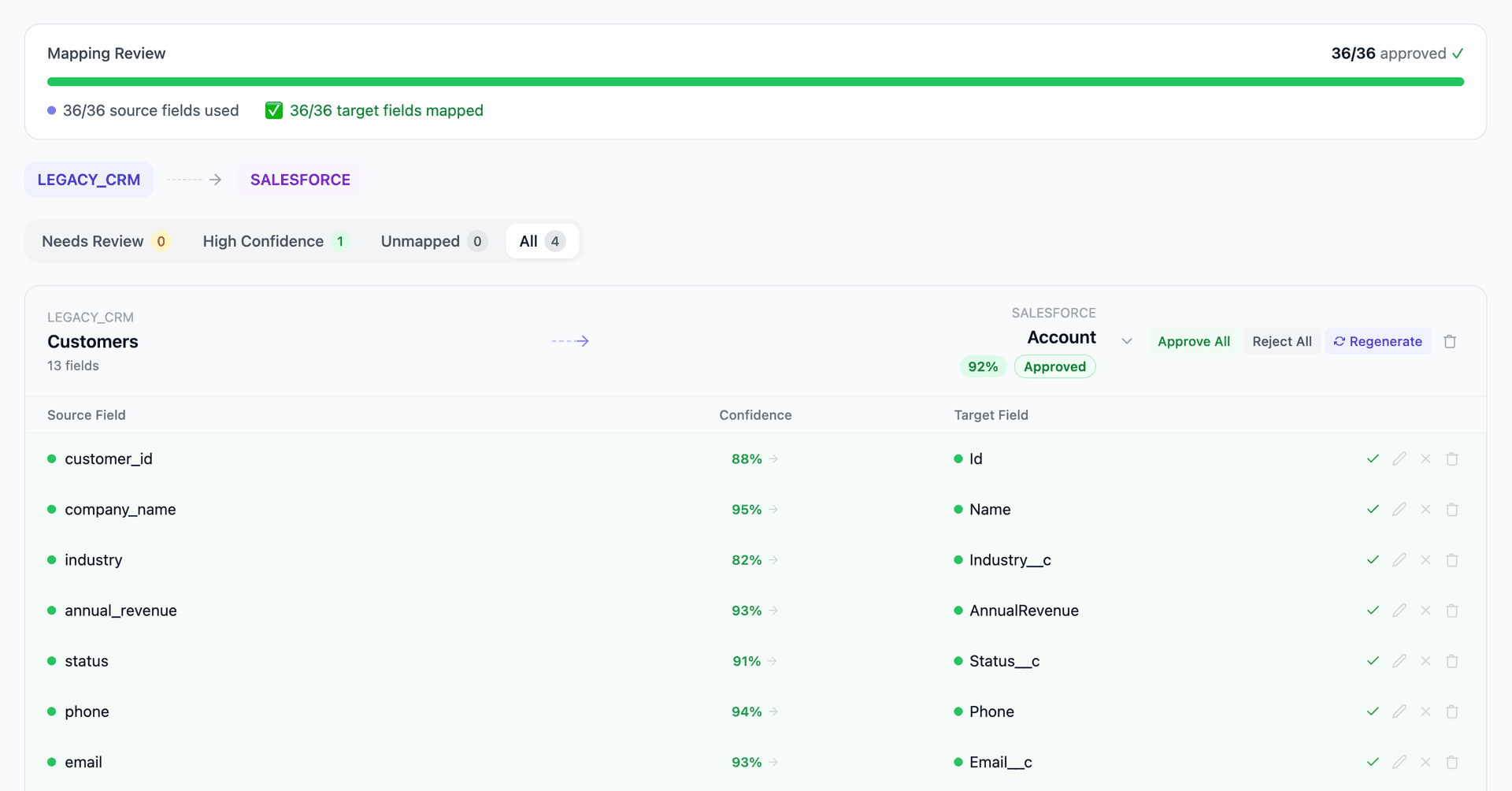
Get your NetSuite to HubSpot mapping analysis — see results in under an hour
Migration timeline: manual vs. Mine
Traditional approach
Timeline
2–4 months
Estimated cost
$80K–300K
Team size
2–3 consultants
Typically requires
×Manual field mapping in spreadsheets
×Custom ABAP/SQL extraction scripts
×3–5 mock migration cycles
×Dedicated source system consultants
×Manual reconciliation testing
With Mine
Enterprise benchmarksTimeline
2–4 weeks
Team size
1 internal resource
Estimated cost
40–50% less
Included
✓Schema profiling & analysis
✓AI-generated field mappings
✓Transformation SQL
✓Validation & readiness reports
✓Production-ready load files
Common challenges migrating from NetSuite to HubSpot
Extracting CRM data from NetSuite's unified model
NetSuite's Customer record combines ERP data (payment terms, credit limit, tax exempt status, currency) with CRM data (sales rep, lead source, territory, category). Migrating to HubSpot means selecting which fields are CRM-relevant and which should stay in NetSuite. Mine helps you define this boundary cleanly.
Explore related migrations →NetSuite subsidiary context in HubSpot
NetSuite customers may have subsidiary-specific data — different sales reps, pricing, and transaction history per subsidiary. HubSpot has no subsidiary concept. Customer data must be consolidated or segmented using HubSpot custom properties or company record owner assignment.
Explore related migrations →Opportunity and estimate pipeline mapping
NetSuite uses Opportunities and Estimates as separate transaction types with different statuses and lifecycles. HubSpot uses a single Deal object with pipeline stages. Deciding whether NetSuite Opportunities and Estimates both become HubSpot Deals — and how their statuses map to deal stages — requires pipeline architecture decisions.
Explore related migrations →Activity and communication history
NetSuite stores activities as phone calls, tasks, events, and messages tied to entity records. HubSpot has its own engagement model with calls, emails, meetings, and notes. The activity association model differs — NetSuite links activities to transaction records while HubSpot associates engagements with contact and company records.
Explore related migrations →NetSuite to HubSpot field mapping — what data moves
10 data objects typically migrated
| Source Object | → | Target Object |
|---|---|---|
| Customer (Company) | → | Company |
| Contact | → | Contact |
| Opportunity | → | Deal |
| Estimate | → | Deal (or Quote) |
| Item line (on opportunities) | → | Line Item |
| Item (product catalog) | → | Product |
| Phone Call / Task / Event | → | Call / Task / Meeting |
| Message / Note | → | Note / Email engagement |
| Lead / Prospect | → | Contact (lifecycle: Lead) |
| Campaign | → | Campaign |
Typical enterprise migrations include 500K–10M+ records across these objects. Mine handles profiling and mapping at any scale.
The cost of manual NetSuite to HubSpot migration
Companies typically handle this with CSV exports from NetSuite and HubSpot's import tool. The challenge is knowing which fields from NetSuite's complex entity records are CRM-relevant and how to restructure them for HubSpot's flatter property model.
Frequently asked questions
Related migration paths
In one enterprise migration, a single field mapping error in customer master data caused $100K in billing discrepancies that went undetected for 6 months.
Mine catches these issues before they reach production.
Built by a team that led SAP, Oracle, and Salesforce data migration programs for Fortune 500 companies at a Big 4 consulting firm. Currently in design partnership with enterprise clients running active migration programs.
Ready to migrate from NetSuite to HubSpot?
Tell us about your migration and we'll show you how Mine can help.
No commitment required. We'll review your migration scope and share a preliminary assessment within 48 hours.
You'll receive a preliminary mapping analysis showing how your source objects map to your target schema, with confidence scores and flagged risk areas.